web
You’re offline. This is a read only version of the page.
close
Skip to main content

Announcements

No record found.

News and Announcements icon
Community site session details

Community site session details

Session Id :
Supply chain | Supply Chain Management, Commerce
Suggested Answer

Purchase RFQ Send Button Disabled and Lines Not Selectable in D365 SCM

(0) ShareShare
ReportReport
Posted on by 93

I am facing an issue while working with Purchase Quotations (RFQ) in D365 SCM.

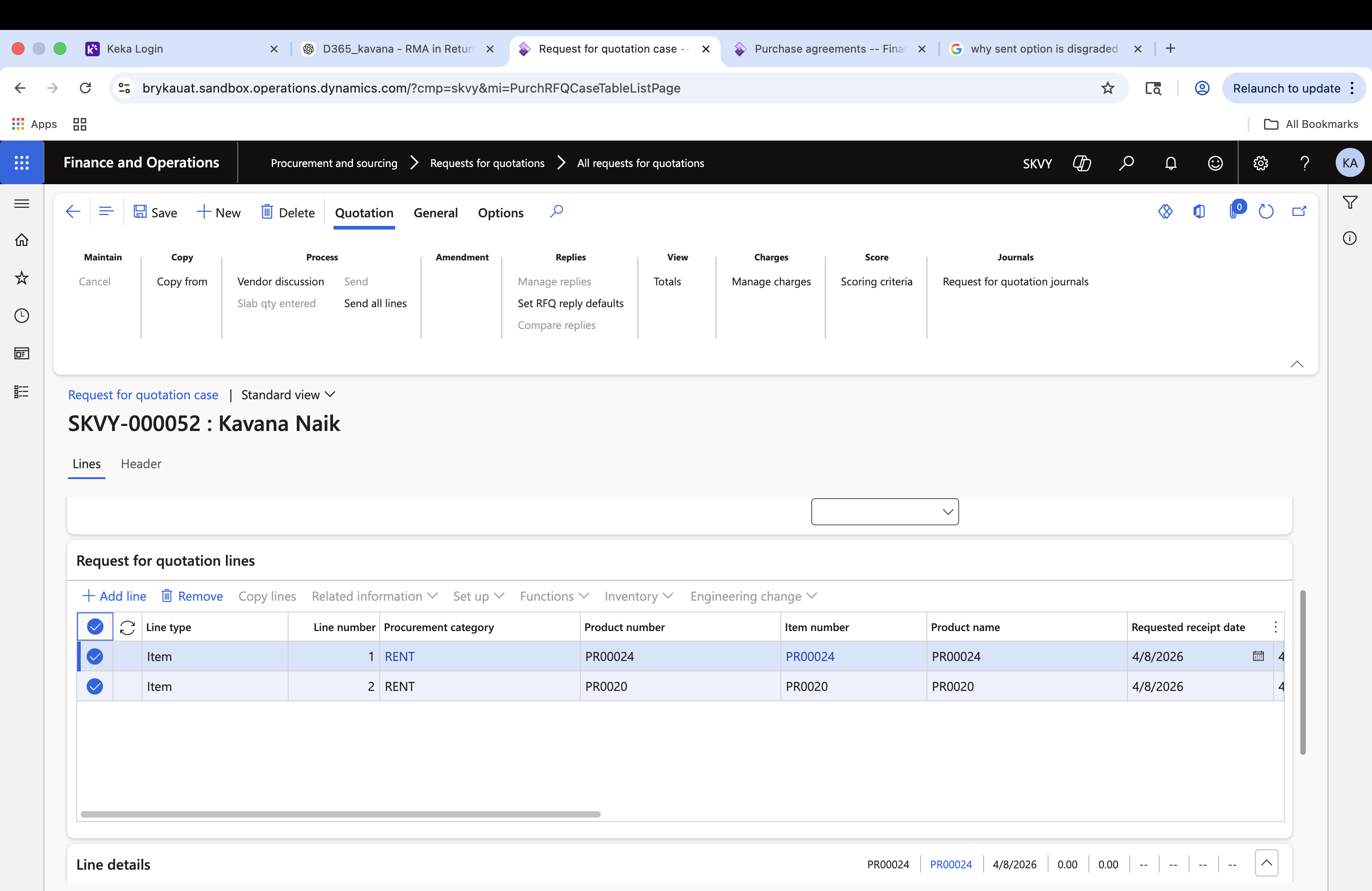
The Send button is disabled

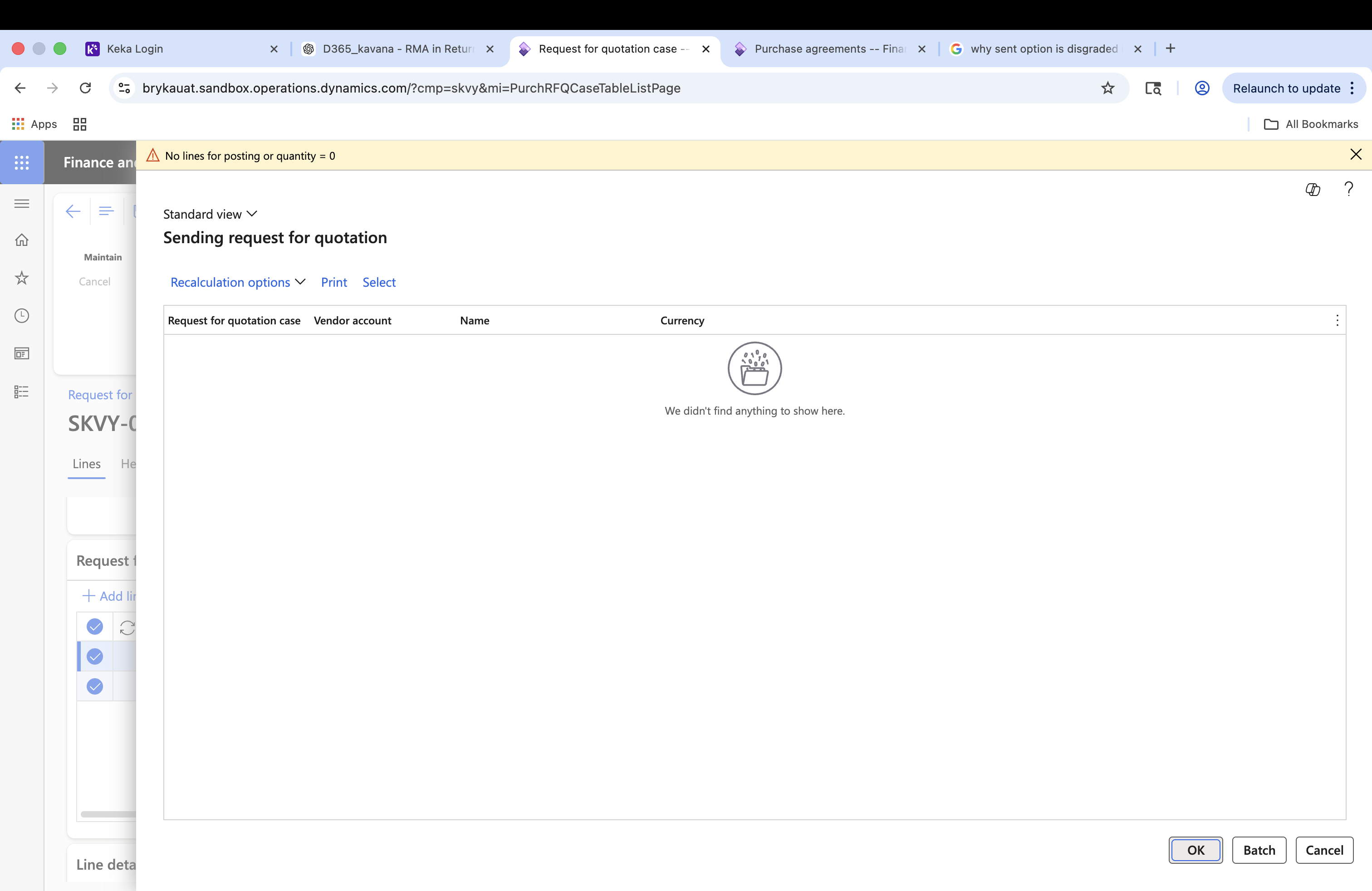
Even after adding lines and entering quantity (> 0), the system shows the error:

“No lines for posting or quantity = 0”

Additionally, the RFQ lines are not selectable

I have already checked the following:

Quantity is entered and saved

RFQ lines are created

Item setup is correct
 
I have the same question (0)
  • Suggested answer
    André Arnaud de Calavon Profile Picture
    304,293 Super User 2026 Season 1 on at
    Hi Kavana,

    Have you added vendors via the header view of the purchase requisition? Without inviting vendors, the Send button is not active.
  • Kavana Profile Picture
    93 on at
    Thank you,
    yes i added the vendor in the header details but still its disabled.
  • Suggested answer
    Mallesh Deshapaga Profile Picture
    1,819 on at
    Have you created the RFQ from the PR? If so, could you please check whether the Purchase Requisition RFQ Rules policy setup is activated?
     
    If the RFQ is created from a Purchase Requisition, the PR must have a status that allows RFQ generation (usually "In Review" or "Pending " Approval"
     
    The Send button is usually grayed out when the vendor has not been added. It should work once the vendor is included. Also, could you please try with the System Administrator role to verify whether the issue is related to missing permissions?
  • André Arnaud de Calavon Profile Picture
    304,293 Super User 2026 Season 1 on at
    Hi Kavana,

    There are more validations, like the status. This should be Created or Sent. Another status is preventing sending the RFQ again. In case the license configuration key Vendor bidding is enabled, the validation also checks if the RFQ is amended. 
  • Kavana Profile Picture
    93 on at
    Thank you for your response.
    I have created the RFQ through the PR, activated the required policies, and added the vendor in the header tab. However, I am still facing the same issue. Additionally, I have verified the status, and it is currently in the “Created” state.
  • Suggested answer
    Mallesh Deshapaga Profile Picture
    1,819 on at

    Is the PR in In review status? Could you please check using the System Administrator role? Also, verify whether any questionnaires need to be added.

    If you are using Public Sector functionality, there is an option to lock RFQ replies, but in your case, it might not be applicable.

    Is this happening for all RFQs, or only this one?


    There aren’t many common reasons for the Send button to be grayed out.

  • Venkat Profile Picture
    150 on at
    Hi Kavana,
     
    Delete the Quotation and re create a new request for quotation if the PR (workflow) is still in "In review" state.
    Assign the vendors and check if the "Send" button is active.
     
    If the PR is already "Approved", then you may have to create a new one from "All requests for quotations". The PR cannot be linked to the PR.
     
    If the issue is only for the one Quotation, probably you can proceed with the proposed workaround. If the issue is for multiple quotations, more analysis is required.
     
    I guess you might have checked and validated all the other suggestions shared by our experts.
     
     
    Regards,
    Venkat
     
  • Kavana Profile Picture
    93 on at

    Thank you.

    Yes PR in Review status and role also system administrator I have validated all the required criteria, and this issue occurs for all RFQs. Even after selecting all lines, the data is not displaying correctly.

    Regards,

    Kavana.

  • Venkat Profile Picture
    150 on at
     
    Is the issue for quotations generated from the PRs or for the quotations created manually also?
     
    Regards,
    Venkat
     
     
  • André Arnaud de Calavon Profile Picture
    304,293 Super User 2026 Season 1 on at
    Hi Kavana,

    I don't know if you have customizations or vendor solutions installed that can influence the current behavior. If the issue is reproducible in a non-production environment, a developer can use the debugger to check why the state of the Send button remains inactive in your environment.

Under review

Thank you for your reply! To ensure a great experience for everyone, your content is awaiting approval by our Community Managers. Please check back later.

Helpful resources

Quick Links

Introducing the 2026 Season 1 community Super Users

Congratulations to our 2026 Super Stars!

Meet the Microsoft Dynamics 365 Contact Center Champions

We are thrilled to have these Champions in our Community!

Congratulations to the March Top 10 Community Leaders

These are the community rock stars!

Leaderboard > Supply chain | Supply Chain Management, Commerce

#1
Mallesh Deshapaga Profile Picture

Mallesh Deshapaga 224

#2
Laurens vd Tang Profile Picture

Laurens vd Tang 163 Super User 2026 Season 1

#3
André Arnaud de Calavon Profile Picture

André Arnaud de Cal... 109 Super User 2026 Season 1

Last 30 days Overall leaderboard

Product updates

Dynamics 365 release plans